
 Let's Talk
 Shopify App · by Takeoff Digital
Emblemly
Let customers add their own logo to your products, priced per position, embroidery or print.
Emblemly turns any Shopify product page into a decoration order form. Customers pick the positions you offer, choose embroidery or print, upload their artwork with a live preview, and pay for every logo at checkout. You approve the artwork before production. No theme code changes.
Listed on the Shopify App Store Adobe Commerce Extension Vendor
 UK eCommerce Awards Finalist Artwork stays in your Shopify Files No theme code changes
How it works
From a product page to a production-ready order in three steps.
The customer does the configuring. The fee is collected at checkout. You only step in to approve the artwork.
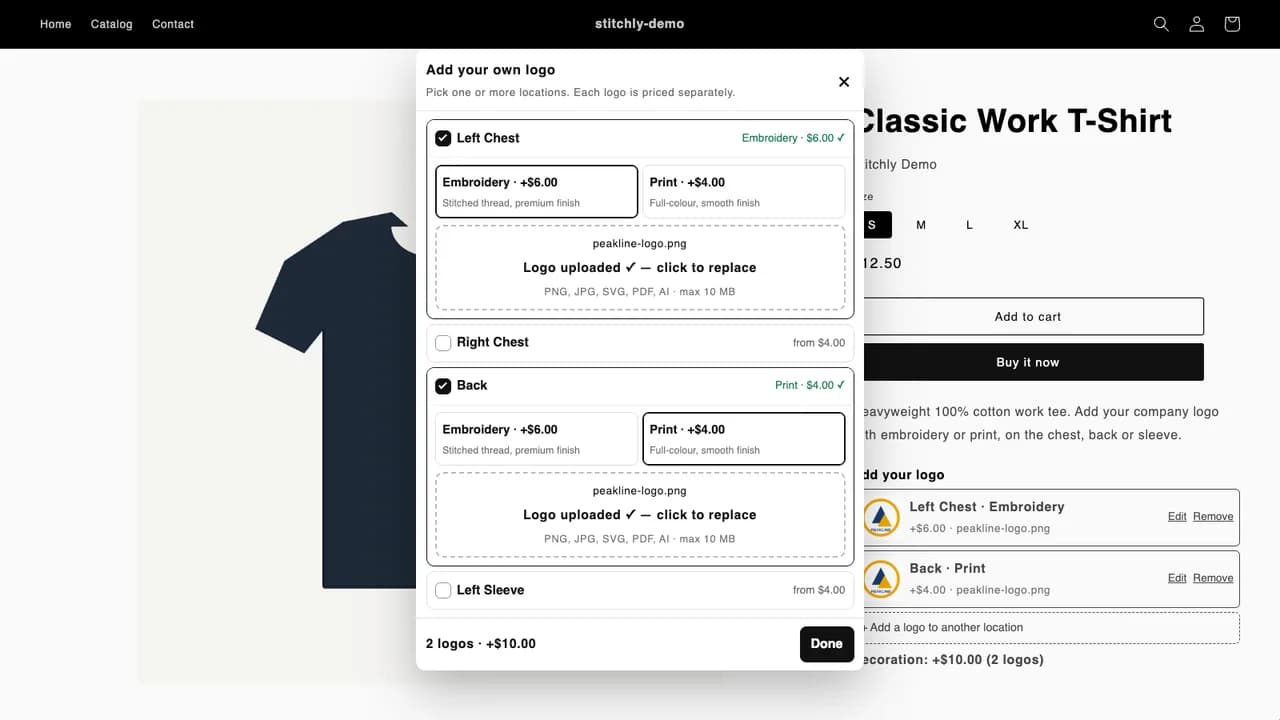
Step 1 · Customer
Choose positions and methods
"Add your own logo" opens a popup listing every position you offer. The customer ticks the ones they want and picks embroidery or print for each, with the price shown next to it.
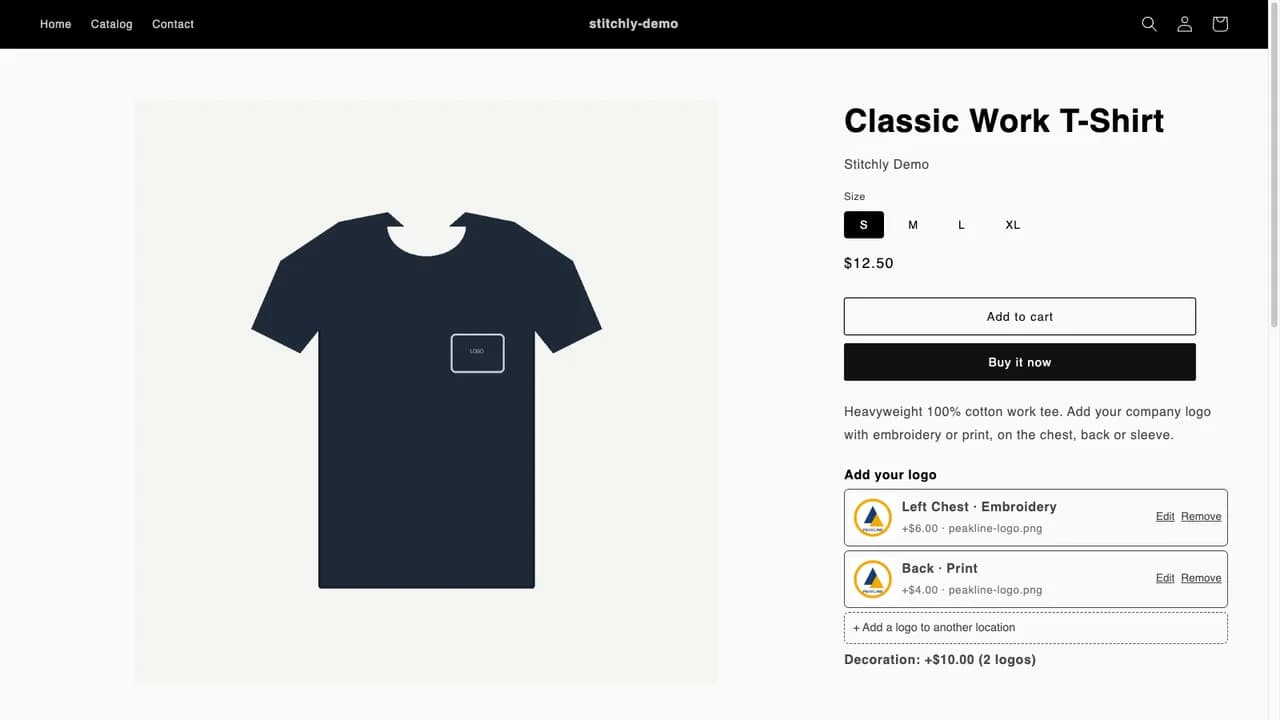
Step 2 · Customer
Upload once, reuse anywhere
PNG, JPG, SVG, PDF or AI, with a live preview on the product page. One upload can be reused on other positions. Files go into your own Shopify Files, not a third-party server.
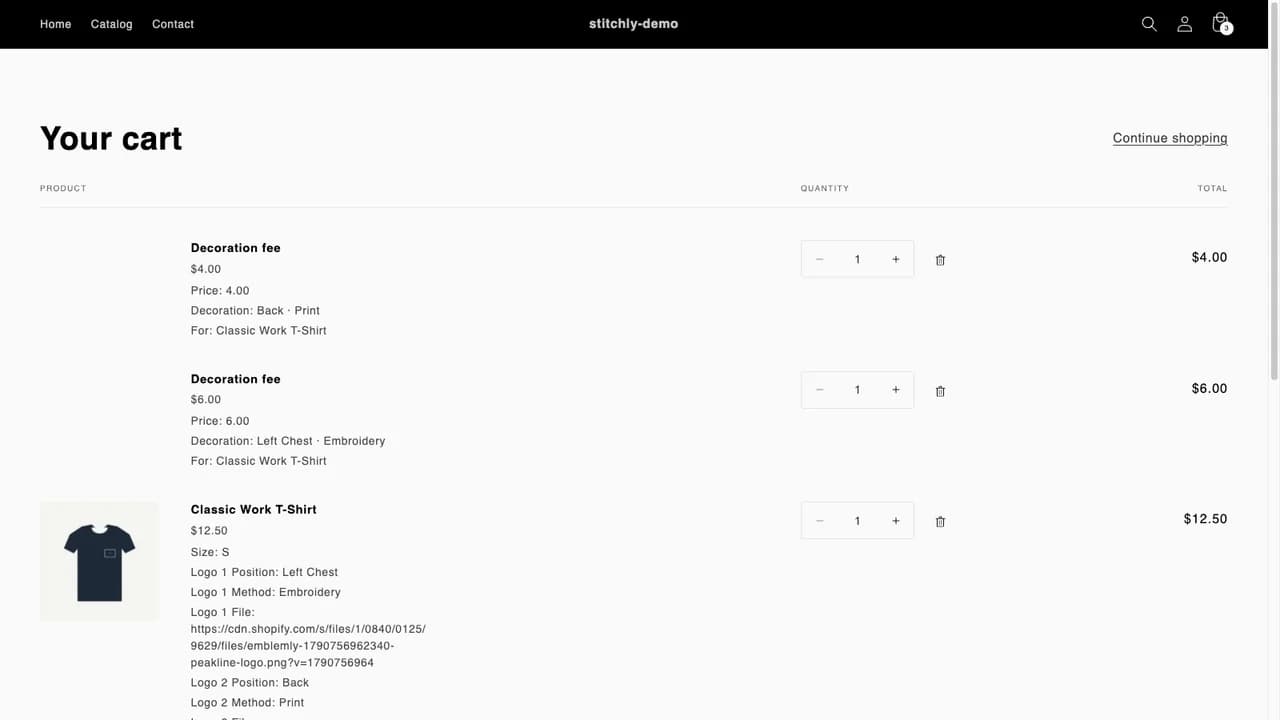
Step 3 · Merchant
Paid at checkout, approved before production
Each logo adds its own decoration fee line to the cart. Every logo then lands in your approval queue with the artwork, position and method, so you approve or reject before anything is produced.
Features
Built for workwear, uniforms and merch. Works for anything with a surface.
Multiple positions per garment
Chest, back, sleeves, or any position you define. Each has its own embroidery and print price. Two logos, two fees, no manual quoting.
Pricing profiles
Assign profiles by collection, tag, product type or single product. The most specific match wins, so T-shirts and jackets can price differently.
Upload with preview, size and type limits
Accept only the formats your decorator can work with and set a maximum file size. Files go straight into Shopify Files under your store.
Paid per logo, at checkout
Each configured logo adds its own decoration line to the cart at the right price and quantity, so the fee is collected with the order, not invoiced later.
Approval queue
Review artwork before production. Approve, reject, open the file, filter by status. One row per logo, so a two-logo order shows two decisions.
One block in the theme editor
Add the Emblemly block to your product template from a single button. It inherits your theme fonts and works on any Online Store 2.0 theme.
What your production team sees on the order
Every decorated line carries plain, readable line-item properties. Your embroiderer or printer opens the artwork straight from the Shopify order. No app login needed.
Classic Work T-Shirt · S            £12.50
  Logo 1 Position   Left Chest
  Logo 1 Method     Embroidery
  Logo 1 File       cdn.shopify.com/…/acme-logo.png
  Logo 2 Position   Back
  Logo 2 Method     Print
  Logo 2 File       cdn.shopify.com/…/acme-logo.png
Decoration fee · £6.00 per logo       £6.00
Decoration fee · £4.00 per logo       £4.00
Your side of it
Three admin screens. Set up in minutes.
Emblemly lives inside your Shopify admin and uses Shopify's own interface, so there is nothing new to learn.
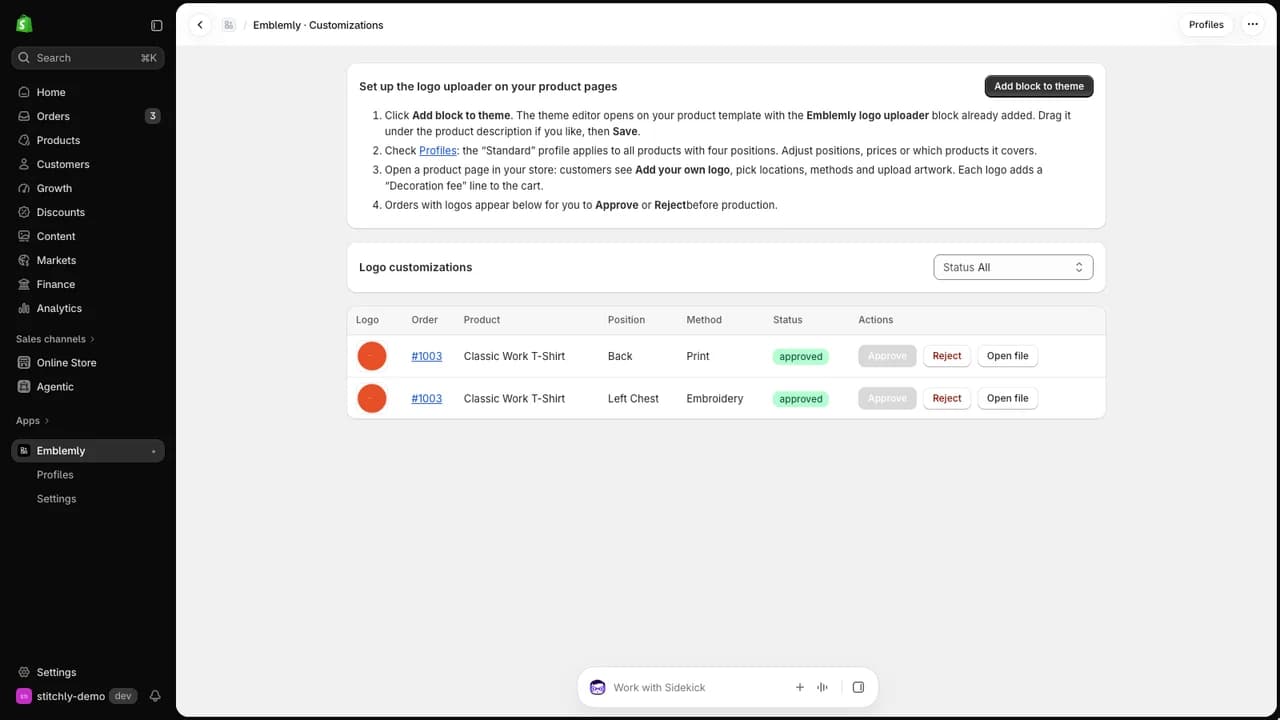
Approval queue
Every logo from every order, with product, position, method and status. Approve, reject or open the artwork. The setup checklist sits at the top until you have added the block.
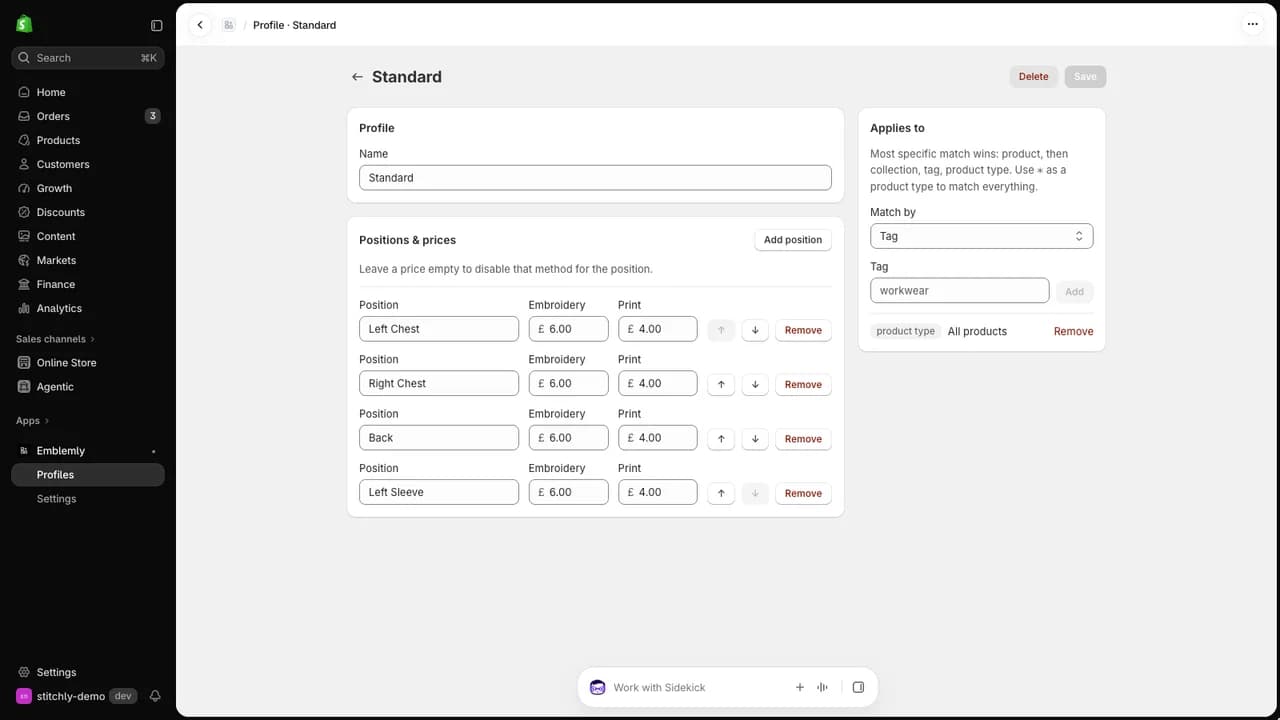
Pricing profiles
Positions with an embroidery price and a print price each. A profile applies to a tag, a product type, a collection or a single product, and the most specific match wins.
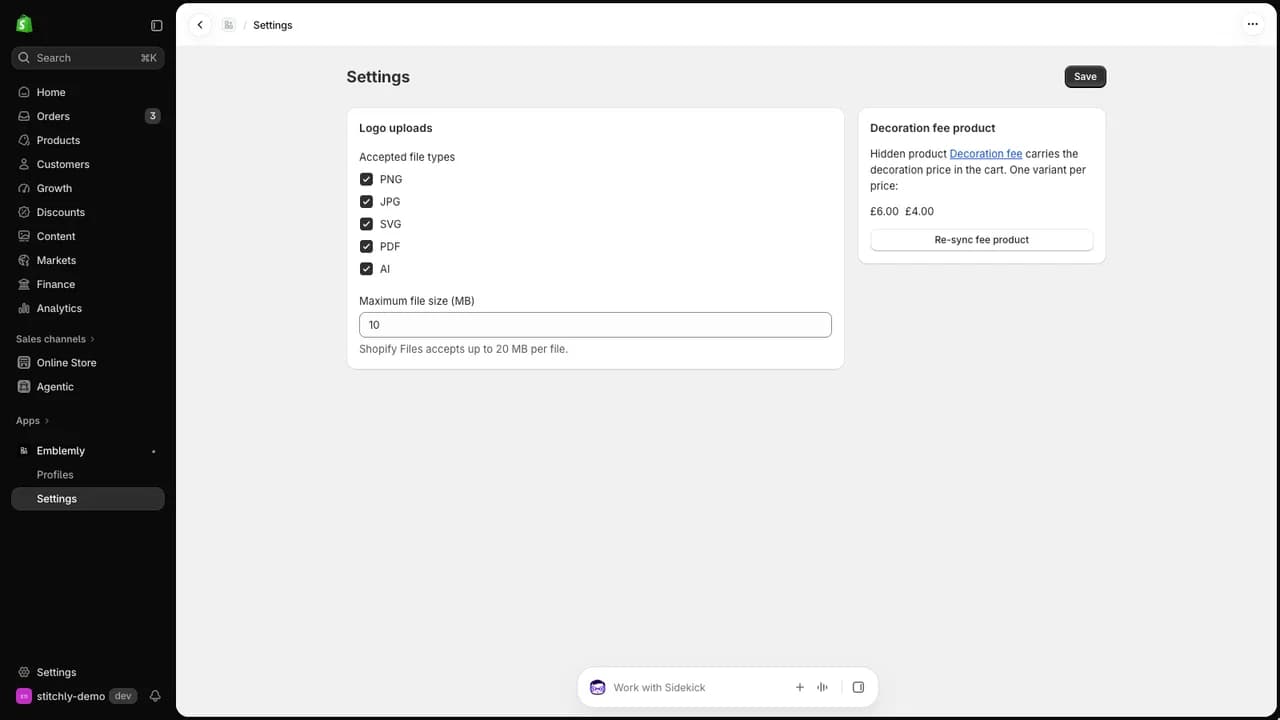
Settings
Which file types to accept, the maximum upload size, and the decoration fee product that carries the prices into the cart, kept in sync automatically.
Who it is for
If you sell things that get a logo put on them
Workwear and uniform suppliers
Polos, fleeces, hi-vis and jackets ordered with a company logo on the chest and the back. The customer configures it on the product page and pays for both positions at checkout.
Promotional merchandise
Tote bags, caps and T-shirts with a client logo in one or several places, priced per position and per method, without a quote by email.
Club, team and school kit
A crest on the left chest, a sponsor on the back, a name on the sleeve. Each position priced separately, each file approved before it goes to the embroiderer.
Decorators and print shops
If you already embroider or print for other businesses, Emblemly turns your Shopify store into the order form your customers use instead of sending artwork by email.
Pricing
One plan. Everything included.
Starter
$25 / month
- ✓14-day free trial, cancel any time
- ✓Unlimited products, positions and orders
- ✓Pricing profiles by collection, tag, type or product
- ✓Approval queue and order properties
- ✓Email support from the team that built it
Billed through Shopify on your regular Shopify invoice, in USD. No contracts, no per-order fees.
A single two-logo tee adds £10 of decoration revenue that used to be quoted by email or left on the table. A handful of decorated orders a month covers the plan.
Questions before you install? Email studio@takeoffdigital.co.uk or call 0330 043 2162.
FAQ
Emblemly questions answered
Does Emblemly work with my Shopify theme?
Emblemly works with any Online Store 2.0 theme. You add the "Emblemly logo uploader" block to your product template from the theme editor with one click. It inherits your theme fonts and colours, and nothing in your theme code is changed.
What file types can customers upload?
PNG, JPG, SVG, PDF and AI. You choose which of these to accept and set a maximum file size in the app settings. Files are stored in your own Shopify Files, under your store, not on a third-party server.
Can I charge a different price for embroidery and print?
Yes. Every position has its own embroidery price and its own print price. A left chest embroidery can be £6.00 while a back print is £4.00, and the customer sees both prices before choosing.
Can different products have different positions and prices?
Yes. Pricing profiles can be assigned by collection, tag, product type or a single product. The most specific match wins, so T-shirts and jackets can carry different positions and prices without duplicating anything.
How is the decoration fee charged?
Each logo the customer configures adds its own "Decoration fee" line to the cart at the right price and quantity, so the fee is paid at checkout with the order. It shows up as its own line in your orders and reports, with the product, position and method it belongs to.
What happens if the artwork is not usable?
Every logo lands in an approval queue in the app with the artwork, position and method. You can open the file, approve it, or reject it before anything goes to your embroiderer or printer. A two-logo order shows as two decisions.
Does my embroiderer need to log in to the app?
No. The order line carries plain line-item properties: position, method and the artwork URL for each logo. Whoever handles production can open the artwork straight from the Shopify order, or from your packing slip.
Can a customer put the same logo on several positions?
Yes. A customer uploads once and can reuse that logo on any other position they tick, or upload a different file per position.
What data does Emblemly store?
No customer names, emails, addresses or payment details. The app stores your pricing configuration, the order and line item IDs for each logo, the chosen position and method, and the public URL of the artwork in your Shopify Files. Uninstalling deletes your store data from the app immediately.
How much does Emblemly cost?
One Starter plan at $25 per month, billed through Shopify on your regular Shopify invoice, with a 14-day free trial. Unlimited products, positions and orders are included, and you can cancel at any time.
More help: Getting started guide · Full FAQ · Changelog · Privacy policy
Built by Takeoff Digital
The agency behind Emblemly builds Shopify apps for clients too
Takeoff Digital is a UK Shopify Partner and Adobe Commerce extension vendor. Emblemly is our own product, built end to end: scoping, build, App Store review and hosting. The same team designs and builds private and public Shopify apps, theme features and integrations for merchants who need something off-the-shelf apps do not do.
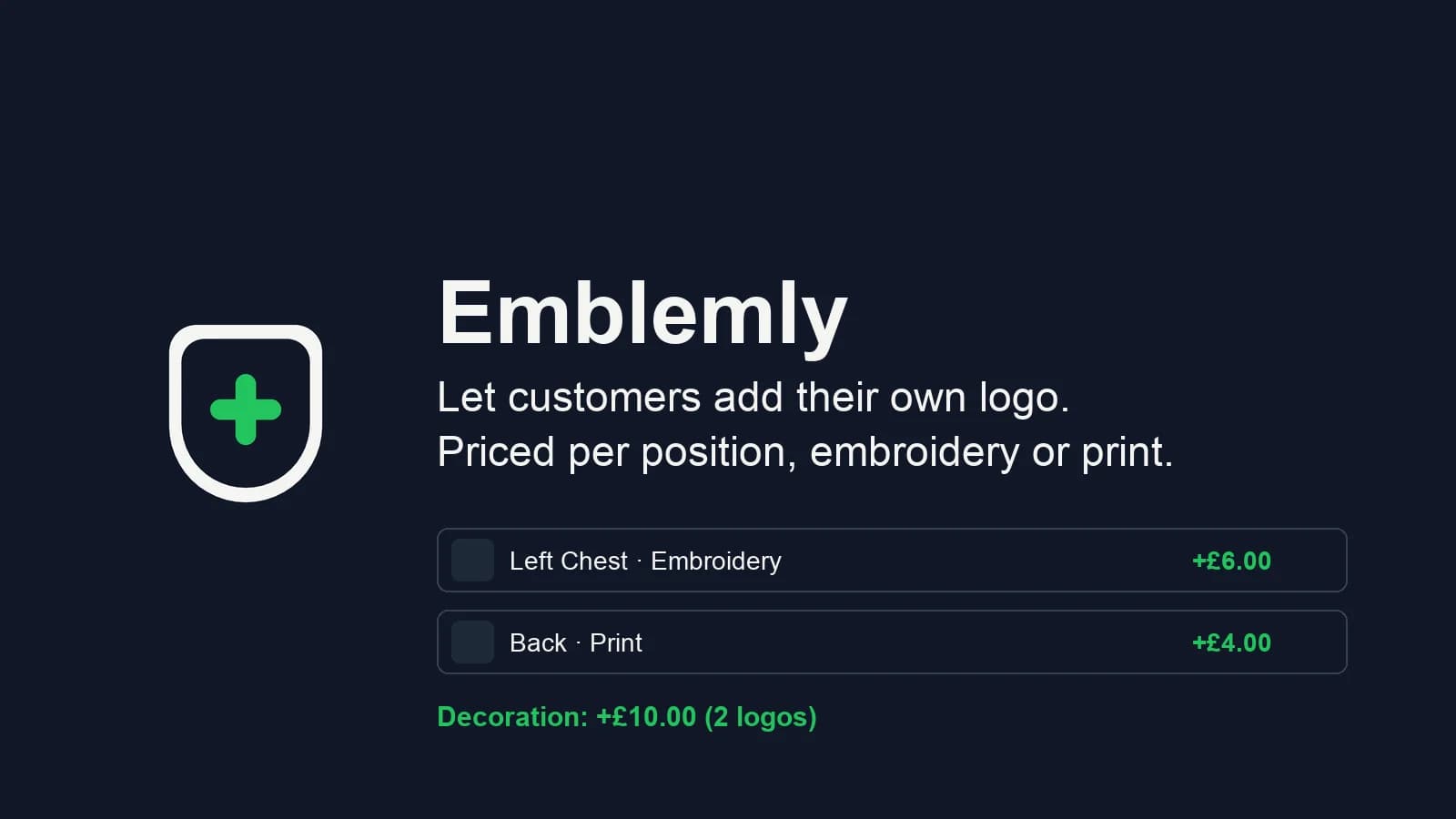
Shopify App Store
Sell the logo, not just the garment.
14-day free trial · $25/month · Unlimited products, positions and orders · Cancel any time